

Publish a task
New tasks are drafts. While a task is a draft, click Save draft (or press Cmd+S / Ctrl+S) to save your work. When it is ready, click Publish. In Ready to publish?:- Click Publish to make it visible now.
- Or tick Schedule time to publish and pick a date and time. The button changes to Schedule. The task shows as SCHEDULED in the course and is hidden from learners until then.
After a quiz is published, you can edit its questions but cannot add or remove them.
Edit a published task
Open the task, click Edit, make your changes and click Save. SensAI asks you to confirm, because learners see the changes straight away. If you close without saving, you can choose Discard changes or Continue editing.Share a course with a cohort
- On the course page, click 🚀 Share with learners. The button appears once the course has at least one published or scheduled task.
- If your school has no cohorts yet, SensAI asks you to create one. Name it, optionally set a drip schedule (below), and click Create cohort. The cohort is created and the course is shared with it.
- If you already have cohorts, pick one, optionally set a drip schedule, and click Publish course to selected cohort. To use a new cohort instead, click Make a new cohort.
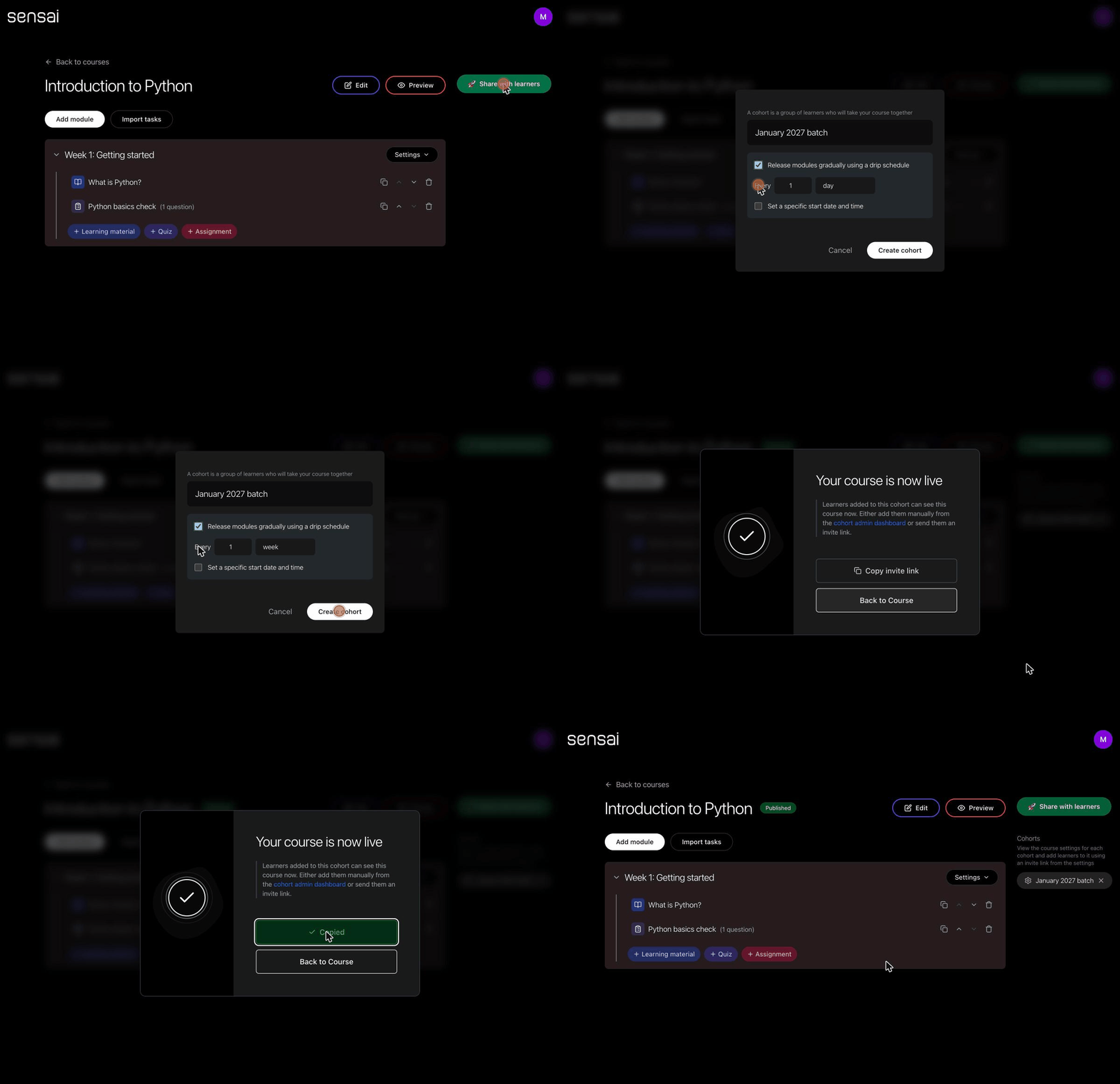
Sharing a course with a new cohort, with modules unlocking every week
Release modules on a drip schedule
A drip schedule unlocks modules one at a time. When you share a course with a cohort, tick Release modules gradually using a drip schedule and set how often a new module unlocks, for example Every 1 week. Units can be minutes, hours, days, weeks, months or years.- By default, the schedule counts from the day each learner joins the cohort, so a learner who joins late starts from the first module.
- Tick Set a specific start date and time to count from one fixed date for everyone.
- The first module with published tasks is always open.
- Each later module unlocks one step after the one before it. Empty modules are skipped.
- Learners see a lock on modules that are not open yet, with the date they unlock.